

The ultimate cursor enhancement tool for Windows. Click effects, physics-driven cursors, animated cursor workshop, holographic trails, ASMR sounds, screen recording — make every mouse movement magical.

Sign in to add this item to your wishlist, follow it, or mark it as ignored

Buy Mousify

INTRODUCTORY OFFER! Offer ends 27 May

-20%
¥ 52.00
¥ 41.60
 

About This Software

Mousify is the ultimate mouse cursor enhancement utility and creation workstation for Windows. Whether you are a content creator, livestreamer, educator, or a desktop customization enthusiast, Mousify adds pure magic to your every mouse movement, click, and screen recording.

🧊 Dynamic Deformation Engine & Physics-Driven FX

  • Damping Spring Physics Simulation: Your cursor stretches, compresses, and bounces in real-time based on your mouse speed. It elongates along the path of rapid movements and delivers a jelly-like elastic overshoot upon sudden stops. Features volume conservation and click-flattening recoil.

  • Physics-Driven Cursor FX: Powered by Verlet integration and PBD (Position-Based Dynamics) constraint solvers. Pendulum Mode makes your cursor swing naturally like a plumb bob on a string, while Chain Mode creates a smooth, fluid-like trailing effect. All string properties are fully adjustable.

  • Dynamic Sprite Animation: Upload any animated GIF, and your cursor will automatically cycle through its frames while moving to "charge up" (e.g., flapping wings, energy accumulation), and decelerate smoothly when static. Bring your cursor to life!

✨ Visual Effects & Creator Workshop

  • Click Visual FX: Choose from ripples, elemental bursts (fire, frost, lightning), and particle explosions. Rendered with GPU acceleration for a buttery-smooth, zero-latency experience.

  • Holographic Halos & Trails: Inject a speed-sensing holographic halo that adapts to your velocity, paired with highly customizable physics-based mouse trails.

  • Animated Cursor Workshop: Transform any GIF or video clip into an animated cursor with a single click. Features frame-by-frame editing, Smart Chroma-Keying (one-click black/白 background removal), and direct export to native Windows .ani formats.

🎥 Highlight Studio Video Editor & Screen Recorder

  • Dual-Process Capture Architecture: Built-in screen recording captures all Mousify effects flawlessly, guaranteeing a stutter-free, high-quality 60 FPS output.

  • Smart Auto-Zoom: A proprietary camera algorithm designed specifically for tutorials and gaming highlights. It automatically tracks mouse movements to generate smooth, cinematic pans and zooms.

  • Advanced Editing Workflow: Add highlight markers to trigger instant slow-motion (video at 0.5x, BGM at original speed). Supports 9:16 vertical exports, background music mixing (with adjustable fade-in/out), sticker/annotation overlays, and custom cropping.

🎮 Game Sync (For Esports & Gaming)

  • Zero Performance Impact: Engineered for AAA titles and competitive gaming. The background process captures only mouse/keyboard telemetry data, ensuring absolute zero frame-rate drops.

  • Automated Video Pairing: Automatically pairs your telemetry data with OBS or ShadowPlay recordings to stitch together cinematic kill-compilations instantly inside Highlight Studio.

🎙️ Presentation, Teaching & Productivity Utility

  • Professional Presentation Suite: Includes Spotlight Mode (dims the screen to focus on the cursor area), On-Screen Keystroke Visualizer, and a built-in Screen Magnifier—the perfect toolkit for tutorials and classroom lectures.

  • Drag & Drop Visualization: Offers 10+ trailing styles including gradient beams, lasers, rainbows, flowing arrows, highlighter annotations, and reading guide lines to make your demonstrations highly expressive.

  • Screenshot & Pin Tool: Capture regions with real-time annotations (brushes, arrows, rectangles, smart shape correction, text). Pin screenshots to hover on top of your screen. Includes an exclusive Tutorial Sequence Mode that auto-saves images numbered by step (Step_001.png, Step_002.png...).

  • ASMR Cursor Audio: Enjoy satisfying audio feedback for every click and scroll—choose from mechanical keyboard clacks, soft taps, or sci-fi electronic chimes. Perfect for ASMR content and immersive workflows.

📦 What's Included

  • 12+ Meticulously crafted built-in cursor themes (Minimalist, Neon, Zodiac, etc.)

  • 10+ Click effects and 10+ Drag & Drop visualization trail styles

  • Complete Cursor Physics Engine (Pendulum / Chain / Dynamic Deformation)

  • Dynamic Sprite Animation System

  • Animated Cursor Workshop (GIF & Video to native cursor converter)

  • Custom Cursor Trails & Holographic Halos

  • Immersive ASMR Audio Packs

  • Spotlight Mode, Keystroke Display, and Screen Magnifier

  • Highlight Studio Video Editor & Game Sync Modules

  • 60 FPS Screen Recorder with overlaid VFX, Screenshot, and Pin tools

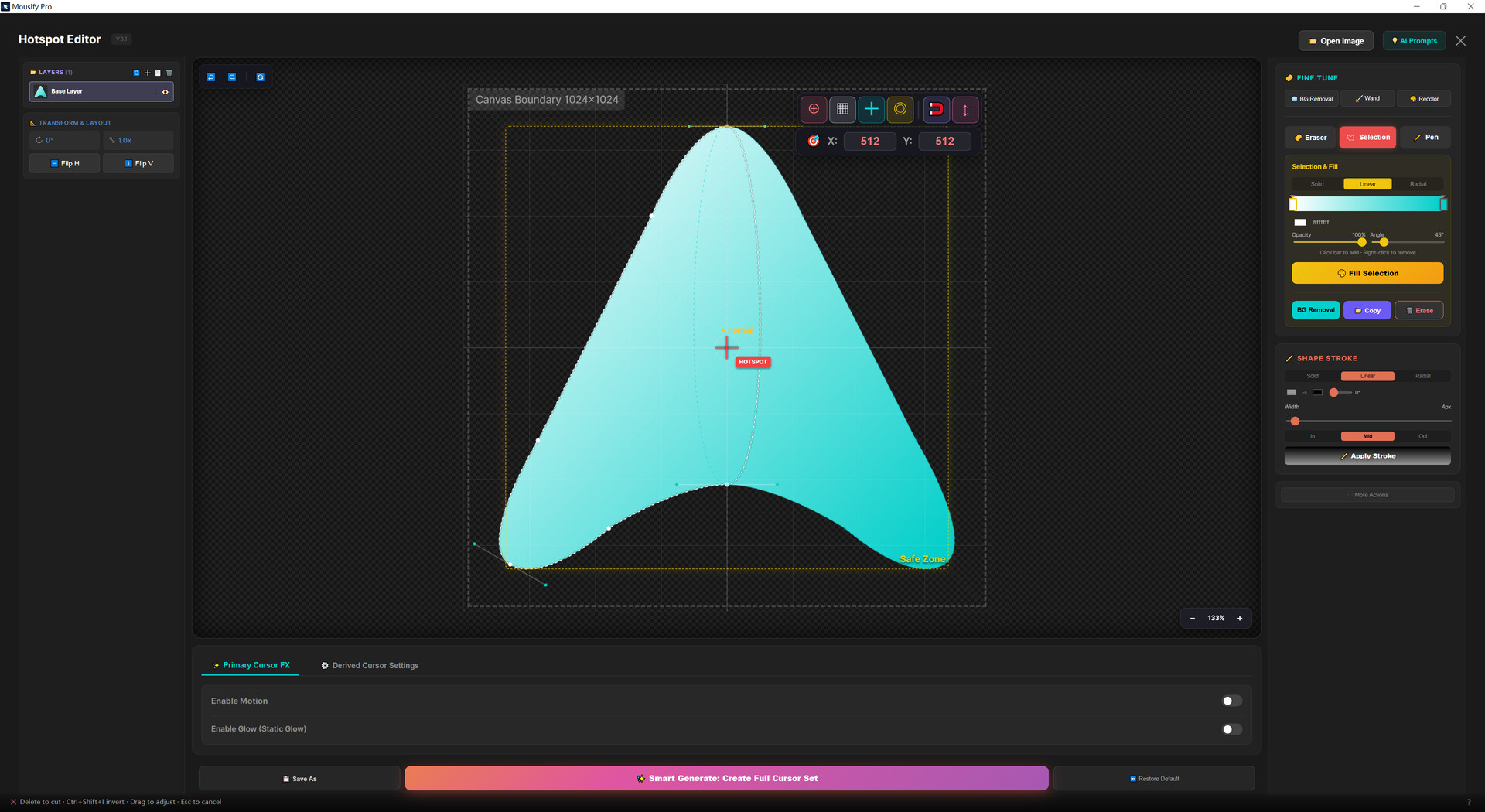
  • Multi-layer Cursor Editor & Background Removal tools

  • Idle Animation Presets (Breathe / Rotate / Hover)

  • Profile Import/Export via .zip files

  • Full-Screen Game Auto-Pause: Automatically suspends heavy visual effects when a full-screen game is detected for pure performance

  • Native localization support for 12 languages

System Requirements

    Minimum:
    • Requires a 64-bit processor and operating system
    • OS: Windows 10 (64-bit)
    • Processor: Intel Core i3 / AMD Ryzen 3 or equivalent
    • Memory: 4 GB RAM
    • Graphics: DirectX 11 compatible GPU
    • DirectX: Version 11
    • Storage: 200 MB available space
    • Additional Notes: WebView2 Runtime required (auto-installed on Windows 10/11)
    Recommended:
    • Requires a 64-bit processor and operating system
    • OS: Windows 11 (64-bit)
    • Processor: Intel Core i5 / AMD Ryzen 5 or equivalent
    • Memory: 8 GB RAM
    • Graphics: NVIDIA GTX 1050 / AMD RX 560 or better
    • DirectX: Version 11
    • Storage: 500 MB available space
    • Additional Notes: FFmpeg required for screen recording (free download prompted on first use)
There are no reviews for this product

You can write your own review for this product to share your experience with the community. Use the area above the purchase buttons on this page to write your review.